Simple and reliable image writing for flash storage
Win32 Disk Imager, developed by gruemaster, is a free and portable utility designed to write raw disk image files to USB drives and SD cards. The program also allows users to create raw backups of these storage devices, making it useful for cloning or preserving data. Its straightforward interface ensures accessibility for users of varying technical experience, while its portability means it can run without installation. This makes it a practical tool for managing flash storage efficiently.
Top Recommended Alternative

Easy image deployment and backup creation
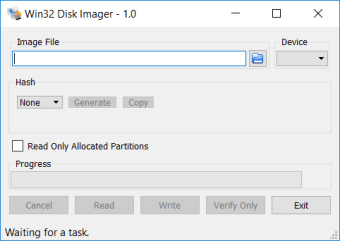
Win32 Disk Imager primarily handles .img and raw disk image files, allowing users to deploy software, operating systems, or other data onto flash storage quickly. Users can also create backups of USB drives or SD cards by generating raw image files, which can later be restored to the same or another compatible device. The interface guides users through reading from and writing to devices with minimal complexity, keeping the process clear and manageable.
Practical limitations and device considerations
The program only works with USB drives and SD cards and does not support optical media such as CDs or DVDs. Additionally, it does not include virtual drive functionality; users must use separate tools to mount image files if needed. Image files are created sector-by-sector, so the resulting file size matches the capacity of the storage device. While this method is reliable, it does not optimize for unused space, and certain file types like ISO files require conversion to IMG format before use.
Final thoughts
Win32 Disk Imager is a focused and reliable solution for creating and restoring raw disk images on flash storage. Its portability, simple workflow, and ability to backup USB drives and SD cards make it suitable for users who need straightforward imaging without extra complexity. While it does not support optical media, ISO files, or virtual mounting, it consistently delivers on its core functionality for flash storage management.

























.png)